 Proxy Scaler
From decklist to
print-ready proxies.
Proxy Scaler fetches Magic: The Gathering card images from Scryfall, runs them through local upscaling models, and lays them out into a print-ready PDF — cut guides, bleed, and double-faced cards all handled for you.
Windows · macOS (Apple Silicon) · Linux — no account, no cloud, runs entirely on your hardware.
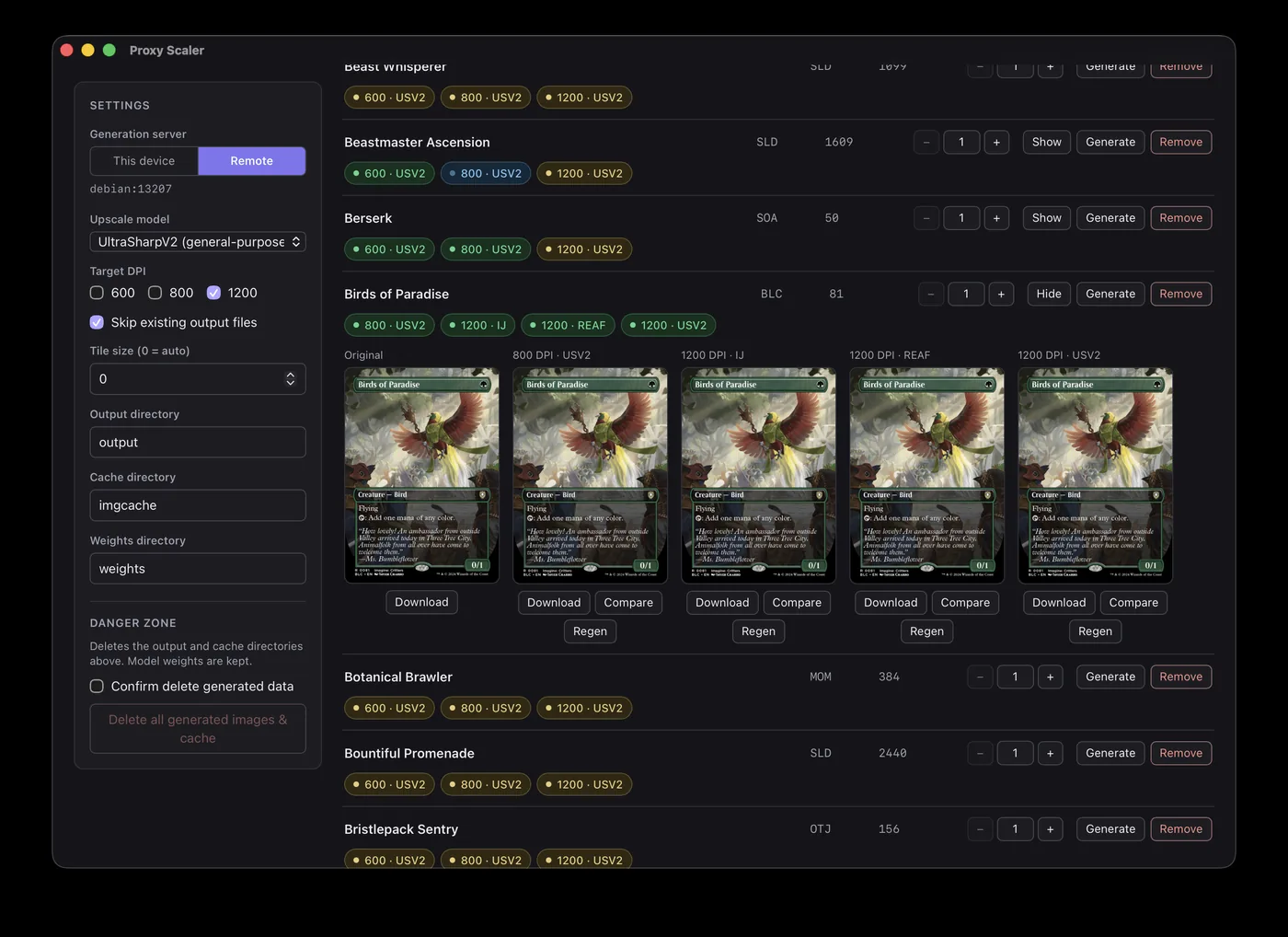
Three steps, one PDF
Import a decklist
Paste a decklist using the set / collector-number format — 1 Sol Ring (c21) 263 — so you get the exact printing you want. Archidekt and Moxfield don't automatically export this, please update your Export Options. Generic 1 Sol Ring lines work too, and both styles can be mixed in one list.
Generate upscaled images
Card art is fetched from Scryfall and upscaled up to 1200 DPI with your choice of upscale model. Generation runs in a background queue with live task status.
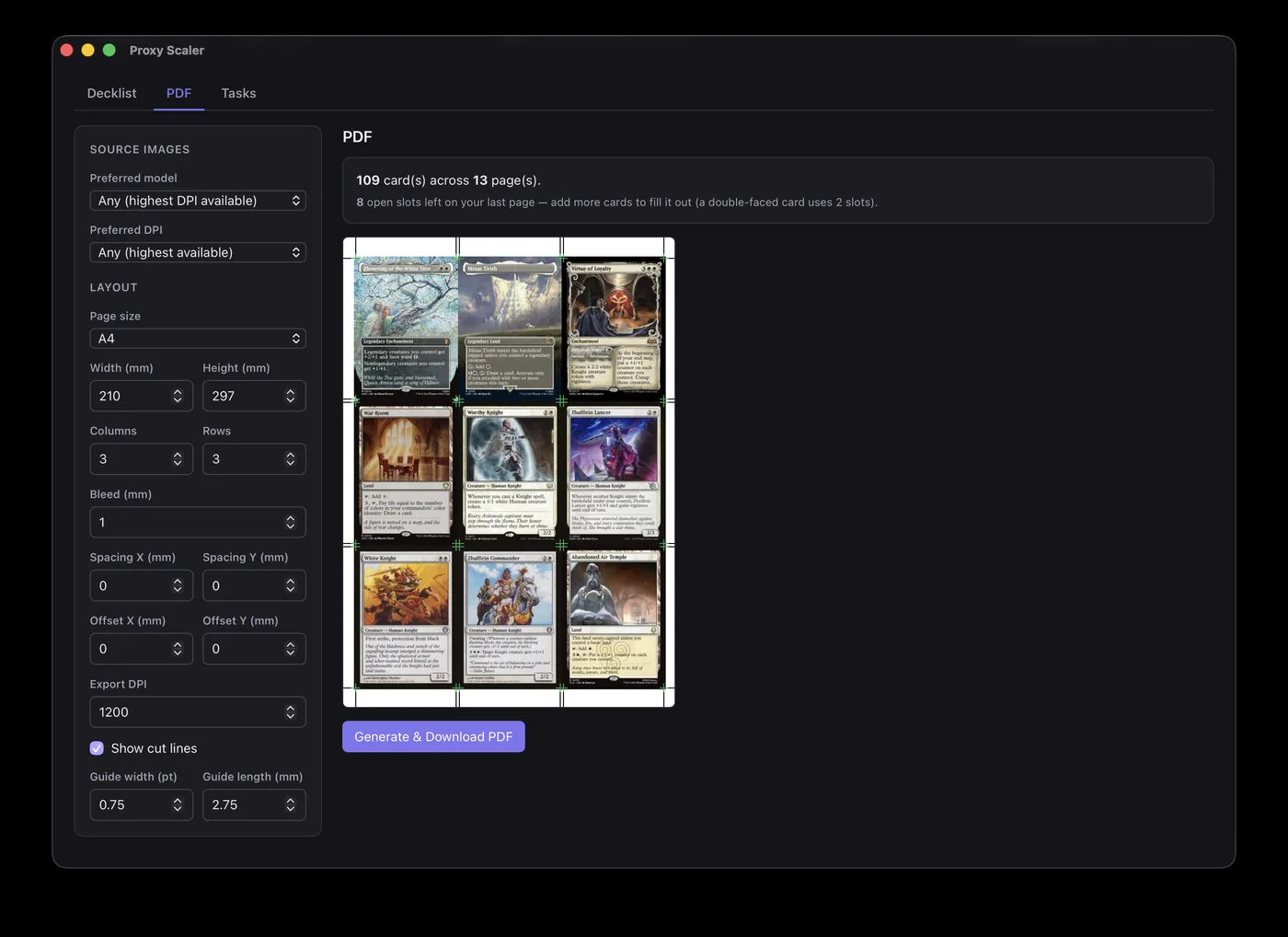
Export the PDF
Pick a page size, tune bleed, spacing, and cut guides, and download a print-ready PDF. Prefer another layout tool? The raw PNGs are yours too.
Built for the way proxies actually get printed
Upscale models tuned for card art
Four bundled models — UltraSharp v2, the much faster UltrasharpV2 Lite, IllustrationJanAI, and a fast Real-ESRGAN variant — all trained on illustration rather than photos. Output at 600, 800, or 1200 DPI.
Print-ready PDF layout
Page-size presets or custom dimensions, bleed, spacing, offsets, and cut-guide width and length. It counts remaining print slots and flags any card still missing an image before you print.
Double-faced cards, handled
Transform and modal double-faced cards get both faces fetched, upscaled, and printed. Split, flip, and adventure cards come through as the single face they are.
Private, local, and free
Everything runs on your machine — no account, no uploads, no subscription. Works on CPU out of the box; a GPU just makes it faster.
Every GPU welcome
Nvidia via CUDA, Apple Silicon via Metal, AMD via ROCm on Linux and DirectML on Windows. Dedicated builds per platform, no toolkit installs — plus Vulkan models in every build for cards the regular path can't handle.
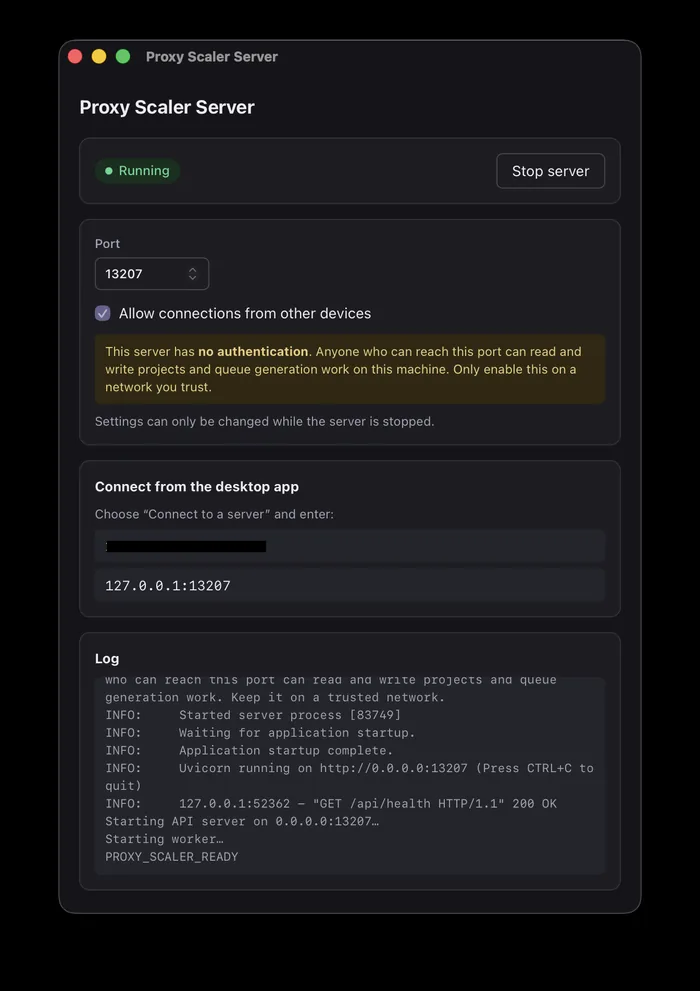
Use a beefier box
The desktop app can hand generation to a server running on another machine — say a GPU desktop reached over your LAN or Tailscale — while your projects stay local.
A proper desktop app
No save button, nothing to configure first — paste a decklist and go. Everything persists as you work.
Download
Installers are self-contained — Python, PyTorch, and the model loader are all bundled. Pick your OS, and on Windows the build that matches your GPU. Current version: 0.4.0.
Windows
Nvidia RTX 20-series or newer, GTX 16-series — also the right pick with no GPU at all cuda
Nvidia GTX 10-series or older — don't use on RTX 50 cards cuda-legacy
AMD or Intel — any DirectX 12 GPU directml
macOS
Apple Silicon (M-series) — Metal acceleration built in macos-arm64
Linux
Nvidia RTX 20-series or newer, GTX 16-series — also the right pick with no GPU at all cuda
Nvidia GTX 10-series or older — don't use on RTX 50 cards cuda-legacy
AMD — ROCm acceleration rocm
Headless server package for Debian/Ubuntu — CLI by default, opt-in systemd service
Desktop and server apps need Ubuntu 22.04 / Debian 12 or newer plus WebKitGTK — see the requirements.
The desktop app is what most people want; the server app hosts generation for other machines to connect to. Prefer the terminal? A Python CLI is covered in the README.
Frequently asked questions
What DPI should I print at?
Leave it at 1200 DPI — even budget printers benefit at that resolution. The upscale models only work at 4×, so the 600 and 800 DPI options are downscaled from the same 1200 DPI result anyway; picking a lower DPI just gives you smaller files from the same upscale.
Any plans for paid features?
Absolutely not. If there's a feature you want, join the Discord and make the request; reasonable ones get tackled as time allows.
Where can I grab my images?
The upscaled PNGs land in an output folder inside the app's per-user data directory:
| Platform | Upscaled images |
|---|---|
| Windows | %APPDATA%\proxy-scaler\output |
| macOS | ~/Library/Application Support/proxy-scaler/output |
| Linux (desktop & server apps) | ~/.local/share/proxy-scaler/output |
| Linux .deb, service mode | /var/lib/proxy-scaler/output |
| Python CLI | output/ in the directory you run it from (-o to change) |
Easier still: the directory paths shown in the app are links — click one and the folder opens in your file explorer.
Updates
v0.4.0 — September 30, 2026
- Custom images can be upscaled - a new Custom images setting on the Decklist tab: Upscale to target DPI upscales an upload to each ticked DPI it doesn't already reach, and Upscale 4× (up to 2400 DPI) keeps the model's full result. Only uploads below a ticked target are upscaled; one too large for your GPU is skipped with a message on its task and prints as uploaded.
- Upscale from the Customs and Backs tabs - each tab now has its own upscale settings and an Upscale button for the selected image, without it being in any project. Backs can be upscaled for the first time. Results are shared: every project that prints the image uses them, and badges under the button list every version that exists.
- Full-image viewer on the Customs and Backs tabs - the magnifier on a tile opens the upload with the trim line drawn on it, rounded to the real card corners, with anything cropped off to fit the card shaded. The name and bleed settings are editable right there.
- Vulkan models - a second group in the model dropdown that runs on almost any graphics card in every build. They exist for GPUs the regular path can't use reliably, such as AMD cards where ROCm or DirectML returned black or garbled images. Expect some to be slower than the regular entries; use them when the regular ones fail on your card.
- GPU VRAM dropdown replaces the tile-size number box - Low (4 GB or less), Medium (6-8 GB), High (12 GB+), Max (16 GB+), with Auto measuring free VRAM per card for the regular models. A pass that fails at one tier retries at the next lower one, then on the CPU.
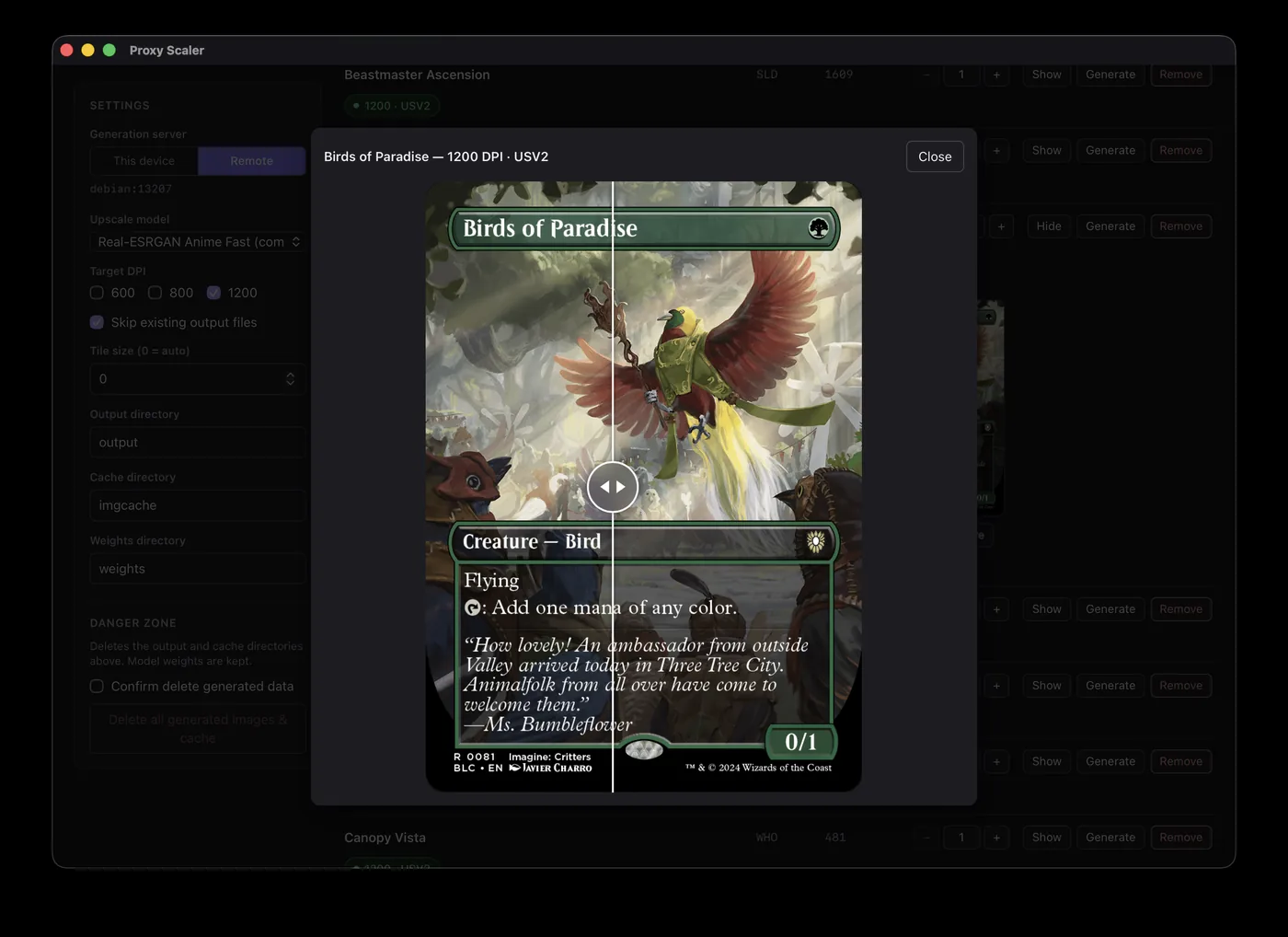
- Compare any two versions - the caret next to Compare on a card's images lets you pick what the slider compares against: the original or any other DPI and model, so you can put two models side by side.
- Guided tutorials - each screen walks you through its controls the first time you open it, with follow-ups the first time cards land, an image is selected, or a preview renders. Replay any of them from the ? button at the end of the tab bar. All skippable if you're feeling familiar enough at this point.
- Keyboard shortcuts - Ctrl+1 to Ctrl+6 (Cmd on a Mac) jump straight to a tab, and Ctrl+N starts a new project.
- Generated images on the Decklist show up faster and use far less memory - the tiles load small previews instead of decoding a ~50 MB bitmap per 1200 DPI card.
- Card lookups no longer pick an Art Series card, token, emblem or other non-playable printing over the real card of the same name. Would happen on rare occasions, nuisance.
- Windows: saving a PDF, ZIP, cut file or image with an edited name no longer drops the extension.
- Windows: the Directories folder buttons failed with "file not found" in remote mode, and tried to SSH into your own machine when the server app ran locally. Both now just open the folder.
- AMD on Windows (DirectML): tiles no longer come back black or as noise; running out of GPU memory now retries at a smaller tile or on the CPU instead of failing the task, no longer leaves every later card on the CPU, and no longer holds the GPU memory until restart.
- Danger Zone -> Delete all now keeps your uploaded custom images.
v0.3.3 — September 2026
- Bleed now fans out of the rounded corners - every bleed pixel takes the color of the nearest point on the card's edge, so corners spread radially instead of filling a square block.
- Gold-bordered cards (Pro Tour Collector Set and the World Championship decks) print cleanly - the white arc on every corner, the white bars stretched out of the corners into the bleed, and the white streak across the top and bottom bleed are gone.
- Even beyond that, every edge defect Scryfall's renders carry - the phantom dark row on some white cards, a phantom white column on a Secret Lair print, the gold template's rim are handled by one rule instead of one fix each, so odd edges no longer need a color signature the code has to recognize.
- Custom images that already include bleed (MakePlayingCards downloads, for example) - tick "This image already includes bleed" in the new Customs sidebar.
- Images you've already generated unfortunately are not going to be retroactively fixed for artifacts. Ideally, you use the "Danger Zone" -> "Delete All" button and restart. I promise the results will be worth it going forward if you are reprinting often.
v0.3.2 — September 19, 2026
A hotfix for generation failing outright in 0.3.0 and 0.3.1. If every card in your Tasks panel failed with "operator torchvision::nms does not exist", this release is for you.
- Generation works again — the 0.3.0 and 0.3.1 installers shipped without a torchvision component the upscaler needs, after torchvision 0.29 renamed the file that the packaging step bundles. Every Linux build (CUDA, CUDA legacy, ROCm) was affected, along with the Windows CUDA legacy build; the macOS, Windows CUDA, and Windows DirectML builds were not. The build now fails outright if that component is missing, so it can't ship silently again.
- After updating — use Retry All in the Tasks panel to re-run any cards that failed with that error.
v0.3.1 — September 18, 2026
A smaller release focused on ZIP exports for print vendors — bleed borders and JPG output, with a progress dialog while they render — plus a fix for lowercase card names when no local card database is loaded.
- Export with bleed — a new option on the Export tab adds a bleed border to every image in the ZIP, defaulting to 3 mm. The bleed size is adjustable, and a selected back marked as already including bleed is handled correctly.
- Export as PNG or JPG — JPG is now the default, re-encoding every image for much smaller vendor uploads (TCGPlaytest, MakePlayingCards) with no visible difference in print; PNG ships the stored images exactly as they are.
- Export progress — ZIP exports that re-render (bleed or JPG) now show the same per-image progress dialog as the PDF, with a Cancel button.
- Lowercase card names resolve — typing a name like "verdant kraken" without a local card database no longer fails with "Card not found". Scryfall's fuzzy search isn't reliably case-insensitive, so names are now matched exactly first, with fuzzy matching kept as the fallback for typos and partial names. Using a database avoids API calls and is still highly recommended.
v0.3.0 — September 16, 2026
Custom images, the top item on the roadmap, are in: print your own card art alongside Scryfall printings. Also new are registration marks for electronic cutting machines, cleaner bleed edges, and tile sizes that fit the VRAM you actually have free.
- Custom images — drop your own card art into the new Customs tab (or straight onto the Decklist) and it becomes a card in the project, with its own quantity and a slot in every PDF and ZIP export, mixed freely with Scryfall printings. Custom images print at the resolution you uploaded and are never upscaled, so the file you prepared is exactly what lands on the page. The Customs tab flags anything below about 300 DPI.
- Custom images on a remote server — the first Generate or export uploads whatever that server hasn't seen, with a progress dialog, and switching servers offers to do the same.
- Cutting-machine support — an Electronic cutter setting on the PDF tab prints Silhouette registration marks (3- or 4-point, Standard or Auto Sheet Feeder inset, marks oriented for how you load the sheet). The page preview shows the marks and their keep-out zones, warns when cards sit under one, and page guides are kept out of the corners the cutter scans; marks can be hidden per side for duplex sheets.
- Download cut file (SVG) — every card's trim box plus the marks, in the cutter's orientation, ready to import into Silhouette Studio.
- One sort control — shared by the Decklist, PDF, and Export tabs, so the order you see is the order that prints and exports. On the PDF tab it now lives under a Deck list heading with the other settings.
- Cleaner bleed edges — light-bordered cards no longer get a black band in the bleed from the thin dark row some Scryfall renders carry on their bottom edge, and freshly downloaded originals are cleaned of the dark fill under their rounded corners that could halo after upscaling.
- Smarter GPU memory use — the automatic tile size now steps through five levels based on the VRAM actually free, so cards with 10 GB or less no longer attempt the largest pass. Running out of VRAM mid-card retries on the GPU at a smaller tile instead of dropping to the much slower CPU path, and a model that did fall back to the CPU returns to the GPU once VRAM frees up.
- Windows — generation stays inside real VRAM instead of silently spilling into system RAM and crawling with the GPU pinned at 100%.
v0.2.1 — September 1, 2026
Generation got faster across the board with parallel processing, new lighter model introduced for an intermediate option, and a handful of edge case bugs fixed.
- UltrasharpV2 Lite — a new bundled model with near-UltraSharp v2 quality in a fraction of the time. Give it a rip, it might be your new default. Great for if you're having difficulties or problems with the performance of the higher tier models.
- Faster generation across the board — models stay loaded between cards instead of reloading for each one, and downloading, upscaling, and encoding now run as separate parallel stages, so the queue keeps moving. Upscaling also uses bf16 precision with tiling sized to your VRAM.
- Multi-DPI runs share one pass — generating a card at several DPIs now runs the model once and derives every size from it, instead of regenerating per DPI.
- CPU fallback notice — when Multistage generation can't run on your GPU, a dialog now tells you it's falling back to the CPU instead of everything just getting slow.
- Patch notes in the app — release notes pop up after an update, and you can reopen them anytime by clicking the version number at the end of the tab bar.
- Fixes — regenerate buttons show their status when clicked and disable while running, projects from older versions load correctly again, the server no longer spins up duplicate workers, and the TCGPlaytest export explains itself when the button is disabled.
v0.2.0 — August 24, 2026
The two most-requested features from 0.1.0, a new way to get images out of the app, and fixes for every known issue on the list.
- Back printing — a new Backs tab holds your card-back library. Turn it on from the PDF tab and every sheet is followed by its mirrored reverse, ready for duplex printing — with a flip-edge preview, blank backs for single-faced cards, and per-side offsets for drifting printers. Double-faced cards can print as one card with both faces on it.
- Change a card's printing — click a card's set/collector button in the decklist view to switch it to any other printing: set, collector number, even language. Powered by a local card database imported from Scryfall bulk data, so most imports and generations skip live API calls entirely.
- All languages support — import decklists in any language Scryfall knows: pick a language next to the Import Cards button, or tick All Languages to match best-effort across all of them. Non-English cards show their printed name in the deck list, and the same card can be in a deck once per printing and language.
- Exports tab — download your images as a ZIP of unique fronts plus your selected back, or as a TCGPlaytest-style ZIP of front/back pairs with quantities included. The ~300 DPI Scryfall originals are exportable too.
- In-app updates — the app checks for new versions on launch and downloads verified installers itself.
- Known issues, fixed — directory paths are now links that open in your file explorer, and tasks interrupted by a crash or restart get a resume-or-cancel prompt (on remote servers too) instead of sticking as "Running".
- PDF layout improvements — portrait/landscape presets that set the matching grid, separate card and page guide toggles per side, and a warning when your grid runs off the page.
Upgrading from 0.1.0? Nothing is required of you, but generated images use a new naming convention going forward — backing up anything you've created so far isn't a bad idea.
Help shape what's next
Planned, in roughly the order they're likely to land — the order is up for debate, and that debate happens on Discord.
- Better project management — see how much storage space each project is consuming, and clean up the ones you no longer need.
- MPCFill exploration — browsing and selecting already-created custom art the way other proxy tools do. The Customs tab added in 0.3.0 is the stop-gap until this exists.